Introduction to CNH DPA5 Troubleshooting
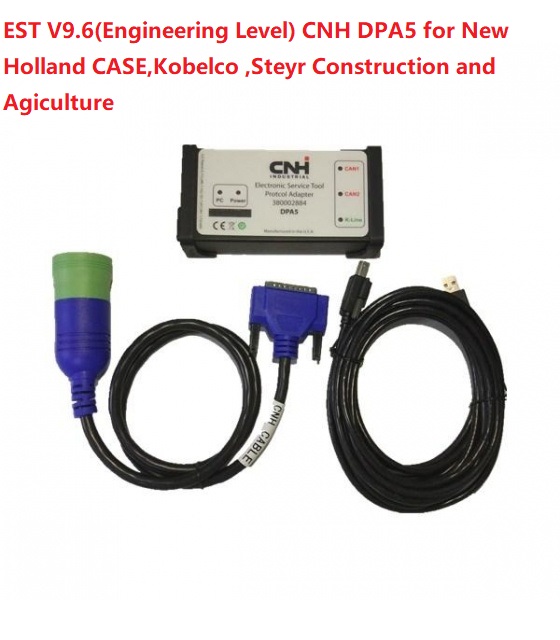
The CNH DPA5 is a widely used diagnostic and communication tool in agricultural and heavy machinery systems. When it works properly, it helps technicians quickly identify and resolve faults in vehicles and equipment. However, like any advanced electronic tool, the CNH DPA5 can sometimes face issues that affect performance. Understanding how to troubleshoot the CNH DPA5 effectively is essential for maintaining smooth operations and reducing downtime. This guide explains the most common problems, causes, and solutions related to CNH DPA5 in a simple and practical way.
Understanding How CNH DPA5 Works
The CNH DPA5 acts as a communication bridge between diagnostic software and machine control units. It connects via USB or wireless interface and transmits data that helps detect faults in engines, transmissions, and electronic systems. Since CNH DPA5 relies on drivers, firmware, and proper configuration, even small issues in setup can lead to connection failures or inaccurate readings. Before troubleshooting, it is important to understand that CNH DPA5 depends on both hardware stability and software compatibility.
Common CNH DPA5 Connection Problems
One of the most frequent issues users face with CNH DPA5 is connection failure. This can happen when the device is not properly detected by the computer or diagnostic software. The main causes include faulty USB ports, outdated drivers, or incorrect installation of CNH DPA5 software. In some cases, antivirus or firewall settings may also block communication. To fix this, users should first check the physical connection, try different USB ports, and ensure that CNH DPA5 drivers are correctly installed and updated.
CNH DPA5 Driver Installation Issues
Improper driver installation is another major reason why CNH DPA5 may not function correctly. If the system does not recognize the device, it usually indicates missing or corrupted drivers. To resolve this, uninstall any existing CNH DPA5 drivers and reinstall the latest version from a trusted source. Always restart the system after installation to ensure proper configuration. Compatibility with the operating system is also important, especially when using newer versions of Windows.
CNH DPA5 Software Not Detecting Device
Sometimes the CNH DPA5 hardware is connected, but the diagnostic software fails to detect it. This issue may be related to incorrect software settings or communication port configuration. Users should verify that the correct communication port is selected in the software settings. Additionally, running the software as an administrator can help solve permission-related issues. Ensuring that CNH DPA5 firmware is updated can also improve detection performance.
CNH DPA5 Firmware and Update Errors
Firmware plays a crucial role in the performance of CNH DPA5. If the firmware is outdated or corrupted, the device may not function properly. Updating the CNH DPA5 firmware regularly ensures compatibility with modern diagnostic systems. However, interruptions during updates can cause errors. To avoid this, always ensure a stable power connection and avoid disconnecting the device during the update process.
Slow Performance or Lag in CNH DPA5
Slow response or lagging issues in CNH DPA5 can affect diagnostic efficiency. This is often caused by low system resources, background applications, or outdated software. Closing unnecessary programs and freeing up system memory can improve performance. Additionally, using a system that meets the recommended specifications for CNH DPA5 will ensure smoother operation. Keeping both software and drivers updated is also essential.
CNH DPA5 Communication Errors with ECU
Communication errors between CNH DPA5 and the vehicle ECU can prevent accurate diagnostics. These errors may occur due to faulty cables, poor connections, or incompatible software versions. Inspecting all physical connections and ensuring the correct protocol settings can help resolve this issue. In some cases, restarting both the diagnostic tool and the vehicle system may restore proper communication.
Preventive Maintenance for CNH DPA5
Preventing issues with CNH DPA5 is easier than fixing them. Regularly updating drivers and firmware, keeping the device clean, and storing it properly can extend its lifespan. Avoid exposing CNH DPA5 to extreme temperatures or moisture, as this can damage internal components. Routine checks and proper handling ensure long-term reliability and stable performance.
Conclusion
Troubleshooting CNH DPA5 requires a clear understanding of both hardware and software factors. Most issues such as connection failures, driver problems, and communication errors can be resolved through simple steps like updating drivers, checking settings, and ensuring proper installation. By following best practices and maintaining CNH DPA5 regularly, users can ensure efficient diagnostics and minimize downtime in their equipment operations.
